The archive we need for the handover is a .tar.gz of your repository with its full commit history, plus its pull requests with their reviews and comments. You make it yourself with GitHub's Migration API or GitLab's project export. You need to own the repository on GitHub (or be an Owner or Migrator of its organisation), or have the Maintainer role or higher on GitLab.
GitHub: you own the repository on your account, or it's in an organisation where you are an Owner or have the Migrator role. GitLab: you have the Maintainer role or higher on the project.
You create a token and run three API calls, following the GitHub or GitLab steps below. The export packs the whole repository: every branch, tag and pull request ref, with the pull requests inside. That is why /code/prepare has you clean every branch and tag in place first. Your branches and tags ship clean. GitHub never rewrites pull request refs (refs/pull/*), so they ship with each pull request's files from before the clean-up: see the last item under Before you start. This delivers the full record.
Pull requests: inside the archive, as pull_requests_*.json files (merge requests in a GitLab export).
Start the exportThe export starts from a finished clean-up on /code/prepare: every branch and tag cleaned and force-pushed in place, any backup branches deleted from GitHub, and a check-repo.sh report on a fresh mirror clone that ends RESULT: ready.
Write run_instruction.md and commit it at the root of every branch, then push, before you clean the history and before anyone exports. Every branch ships, so each branch tip needs it. The archive contains only what is committed. A file added after the clean-up means running the clean-up again, then the export again.
On GitHub, a user export works only for repositories your account owns. Collaborator access is not enough, and GitHub rejects the request (typically 422 Validation Failed). For a repository in an organisation, you must be an Owner of the organisation or have the Migrator role. On GitLab, you need the Maintainer role or higher. If none applies, message us before you go further.
Secrets quoted in a pull request description or review comment, including the diff snippets shown in review comments, survive a history clean: the clean-up rewrites git, not pull requests. Edit or delete them on GitHub or GitLab before the export, and search the pull request JSON before you send the archive (the Verify step shows how).
Pull request refs (refs/pull/*) ship as GitHub holds them: never rewritten, so they keep each pull request's files from before the clean-up, and you can't delete them. Rotating every credential (step 6 on /code/prepare) makes any secret there useless. Personal data there isn't fixed by rotation: send us what check-repo.sh reports in section [10], and we decide together on the handover call.
Never paste your token into a chat, an email or a form. You only use it in your own terminal, and you can delete it on GitHub or GitLab once the archive is downloaded.
The git repository (repositories/<owner>/<repo>.git in a GitHub export, project.bundle in a GitLab one) with every branch and tag and every commit, unsquashed.
With their reviews and comments, as pull_requests_*.json inside the archive (merge requests in a GitLab export).
At the root of every branch, committed before the clean-up. It sits inside the git repository, not loose in the archive.
Fill these in once. The AI prompt and every command below are generated for your repo, so you can copy them as they are.
You can also paste the full repo URL into either field. On GitLab, use your GitLab username and project name (a project inside a subgroup needs its full path, so fill the commands in by hand).
Open your repo in an AI coding assistant (Claude Code, Cursor or similar) and paste the prompt. It reads your repo and guides you through it step by step. You stay in charge:
Checks that every branch and tag was cleaned in place and that run_instruction.md is on every branch, explains refs/pull/*, tells you which token to create, gives you the export commands for your repo, then verifies the archive with you.
You are helping me produce the archive for the sale of this repository: a
.tar.gz with the full commit history and the pull requests, made with GitHub's
Migration API or GitLab's project export. The full guide is at
https://xephas.me/code/export/ and the plain-text version at
https://xephas.me/code/export.md. Read it first if you can.

SAFETY RULES. FOLLOW THESE ABOVE EVERYTHING ELSE
1. Never ask me for a token, never print one, never write one to a file, and
   never commit one. I type my token into my own shell myself (see TOKEN
   below). Refer to it only as $MIGRATION_TOKEN.
2. Show me every command before you run it, and say what it does. Run
   read-only commands only (git status, git log, git branch, git ls-remote,
   git ls-tree, tar -t, grep). For anything else, give me the command and let
   me run it.
3. Never start an export (any POST to a migrations or export endpoint) on
   your own. I run it myself, or you run it only after I say yes to that exact
   command, every time.
4. Never force-push, rewrite or clean history, delete a branch or tag, change
   git config, commit or push on your own. If I ask for help with one of
   these, show me the exact command and run it only after I say yes to that
   exact command, every time.
5. If something looks wrong (a secret, an uncleaned branch, a missing file),
   stop and tell me. Don't try to fix it on your own.

WHAT TO DO, IN ORDER
1. Work out where the repo lives. Run `git remote -v` and tell me the host
   (GitHub or GitLab) and the owner/repo path.

2. Check I can run the export. Ask me, don't guess: on GitHub I own the repo
   on my own account, or it is in an organisation where I am an Owner or have
   the Migrator role. On GitLab I have the Maintainer role or higher on the
   project. If none applies, stop and tell me to message the buyers before
   going further.

3. Check the repo before any export. The export ships every branch, tag and
   pull request ref, so the guide has me clean every branch and tag IN PLACE
   first (https://xephas.me/code/prepare/):
   - List every branch and tag on the remote with
     `git ls-remote --heads --tags origin`. Ask me to confirm each one was
     cleaned and force-pushed with clean-history.sh. If I haven't done the
     clean-up yet, stop and point me to the guide's steps; don't clean
     anything yourself.
   - Flag any branch that looks like a backup (pre-sanitise, pre-clean,
     backup...). It would ship the old history: I must delete it from the
     remote before exporting, and keep my backup offline.
   - Ask whether a fresh `git clone --mirror` checked with check-repo.sh ends
     RESULT: ready. If not, stop.
   - Check that run_instruction.md is committed at the root of EVERY branch
     (every branch tip ships). After `git fetch origin` (give it to me to run
     if the remote-tracking refs are stale), run for each branch:
     `git ls-tree -r --name-only origin/<branch> | grep -x run_instruction.md`.
     If it is missing on any branch, stop: it must be committed on every
     branch before the history clean-up and before the export, so I have to
     add it and redo the clean-up. Point me to
     https://xephas.me/code/prepare/#run-instruction.
   - Ask me to run `git ls-remote origin 'refs/pull/*'` and tell me what it
     means: GitHub never rewrites these and I can't delete them, and the
     export includes them, so they still hold each pull request's files from
     before the clean-up. Do not tell me the archive is fully clean. Rotating
     every credential makes any secret there useless; personal data there is
     NOT fixed by rotation. I report what check-repo.sh section [10] shows,
     and the decision is made on the handover call.

4. The token. Tell me exactly which token to create:
   - GitHub: a classic personal access token (it starts with ghp_; tokens
     starting github_pat_ don't work). Scopes: repo and user for a repo on my
     account; repo and admin:org for an organisation repo.
   - GitLab: a legacy personal access token with api and write_repository.
   Then tell me to load it into my shell myself, without it showing on screen
   or landing in my shell history:
     read -rs MIGRATION_TOKEN && export MIGRATION_TOKEN

5. The export commands. Give me the exact commands for my case,
   with my owner/repo filled in, using "$MIGRATION_TOKEN" for the token. Use
   placeholders like <MIGRATION_ID> and <PROJECT_ID> where I have to copy a
   value from a response. GitHub, repo on my account (organisations use
   /orgs/<YOUR_ORG_NAME>/migrations with "X-GitHub-Api-Version: 2026-03-10"
   and only the repo name in "repositories"):
     start:    POST https://api.github.com/user/migrations
               body {"lock_repositories":false, "repositories":["owner/repo"]}
               headers Accept: application/vnd.github+json,
                       Authorization: Bearer $MIGRATION_TOKEN,
                       X-GitHub-Api-Version: 2022-11-28
               then read the "id" in the response: that is <MIGRATION_ID>
     wait:     GET .../migrations/<MIGRATION_ID> until "state" is "exported"
     download: GET .../migrations/<MIGRATION_ID>/archive -o <name>.tar.gz
   GitLab:
     start:    POST https://gitlab.com/api/v4/projects/<owner>%2F<repo>/export
               header PRIVATE-TOKEN: $MIGRATION_TOKEN (expect 202 Accepted)
     wait:     GET the same URL until "export_status" is "finished"
     download: GET https://gitlab.com/api/v4/projects/<PROJECT_ID>/export/download
   Remind me: I run the start command myself, or you run it only after I say
   yes to it.

6. Verify the downloaded archive with me. Give me these, explain what each
   result means, and read the output with me:
   - GitHub: `tar -tzf <name>.tar.gz | grep -c 'pull_requests_'` (0 is only
     right if the repo has no pull requests), and the git repository under
     repositories/<owner>/<repo>.git.
   - Unpack it into a new folder (export-check), then list every ref with
     `git --git-dir=<path to the .git folder> for-each-ref --format='%(refname)'`.
     It must show every branch and tag I cleaned. A backup or pre-clean
     branch there means its old history is in the archive: tell me not to
     send it. refs/pull/* are expected: explain that they hold pre-clean
     files, that rotation covers secrets but not personal data, and that
     what section [10] reports goes to the handover call.
   - For every branch in that list, check run_instruction.md at its tip with
     `git --git-dir=<...> cat-file -e <branch-ref>:run_instruction.md` and
     count its commits with `rev-list --count <branch-ref>`.
   - Run `bash check-repo.sh <path to the .git folder>` on the archive itself
     and read the per-branch table and section [10] with me. It must end
     RESULT: ready.
   - Search the pull request JSON for secrets, since secrets quoted in a pull
     request or review comment survive a history clean:
     `grep -lEi 'sk_live|sk_test|AKIA[0-9A-Z]{16}|ghp_|github_pat_|glpat-|PRIVATE KEY|password' export-check/*.json`
     It must print nothing. If it names a file, show me the matching lines with
     the secret value masked, and stop.
   - GitLab: check project.bundle and merge_requests are in the archive, then
     `git clone --bare export-check/project.bundle export-check/repo.git` (I
     run it) and do the same ref, run_instruction.md and check-repo.sh checks.

7. Finish with a short summary: the branches and tags in the
   archive, the number of refs/pull/* and what check-repo.sh said about them, the commit count, the number of pull request files, whether
   run_instruction.md is there, and anything I still need to fix. Remind me to
delete the token on GitHub or GitLab once the archive is verified.Seven steps: a token, three API calls, and a check. Fill in your username and repository at the top of this page and the commands fill themselves in. Replace <YOUR_TOKEN>, <MIGRATION_ID> and <YOUR_ORG_NAME> yourself.
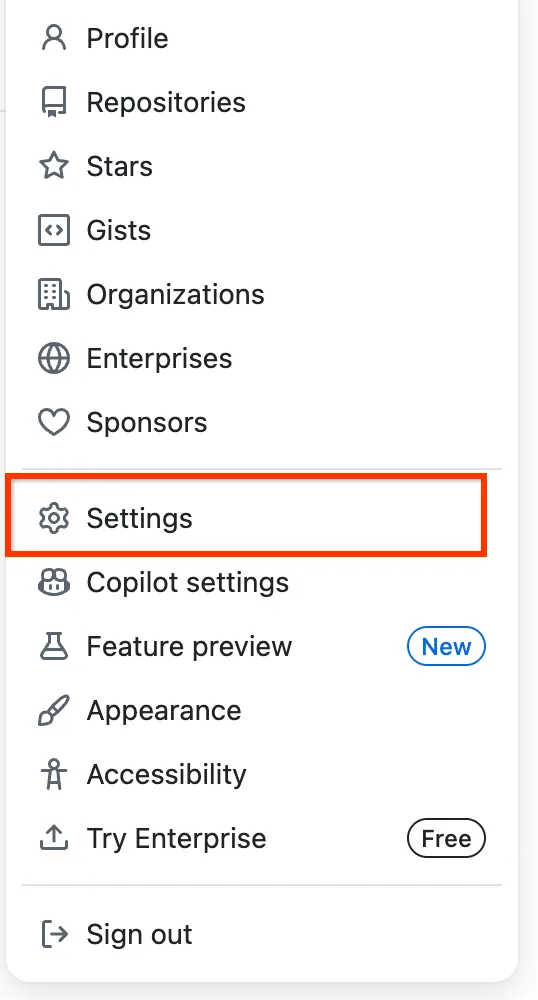
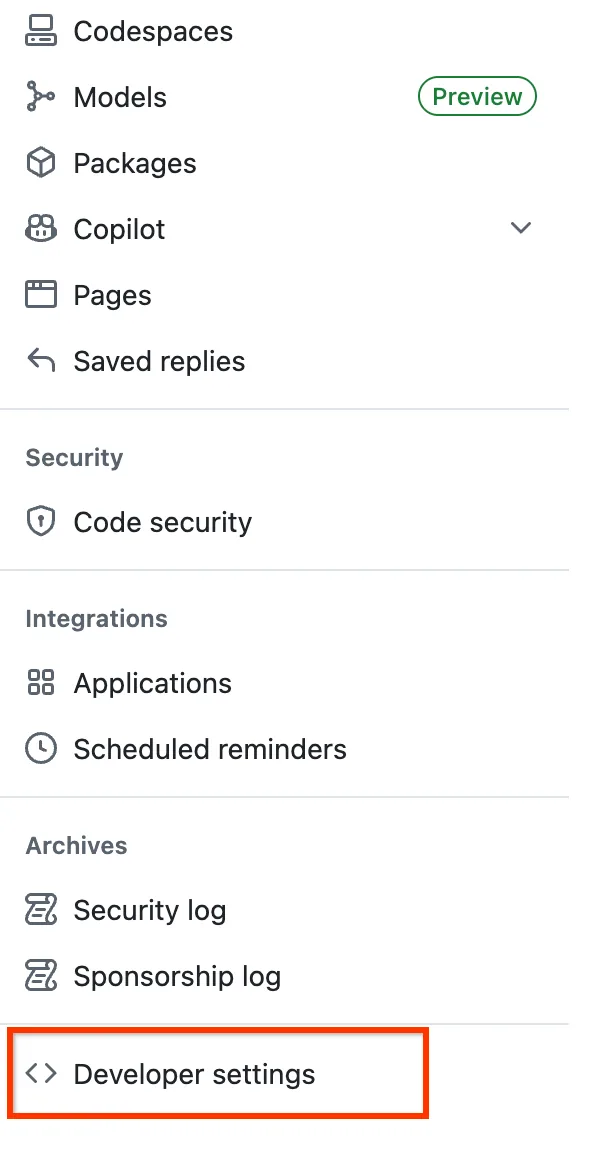
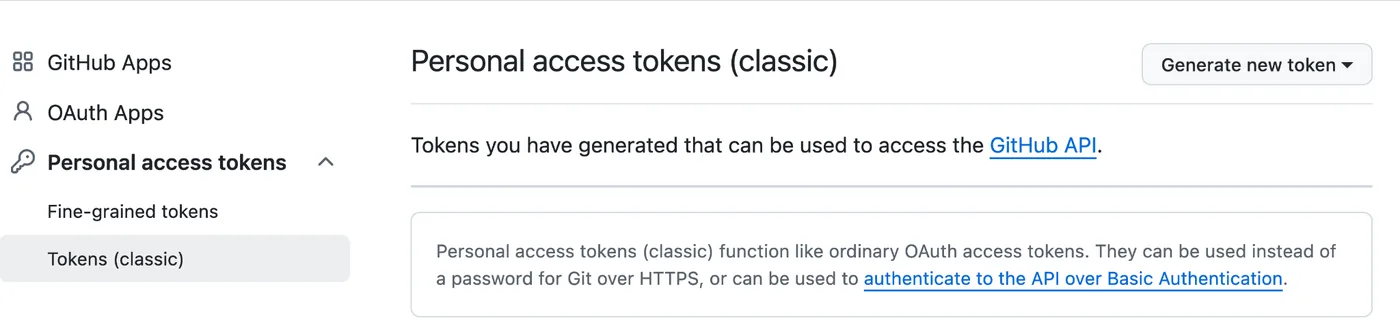
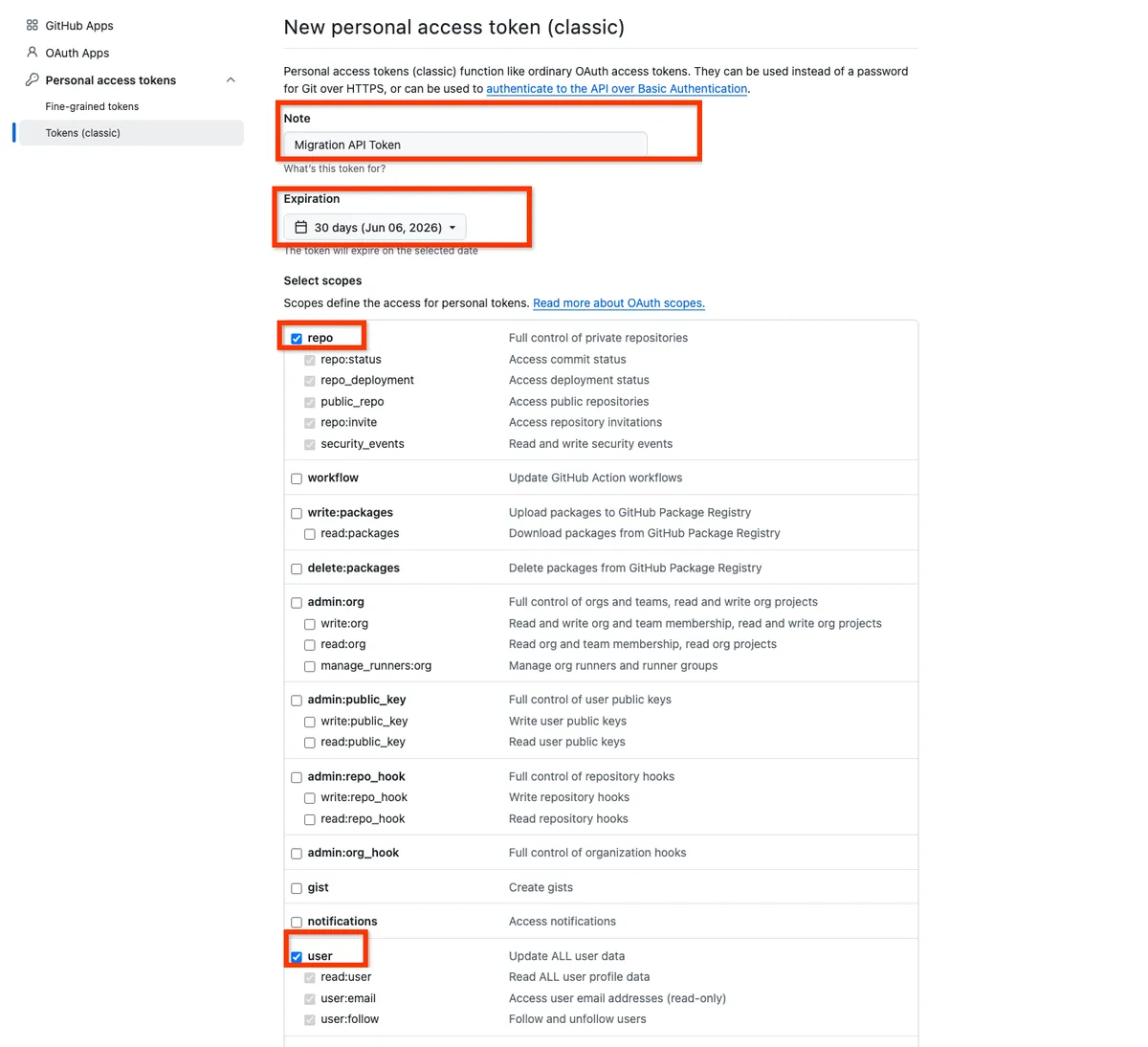
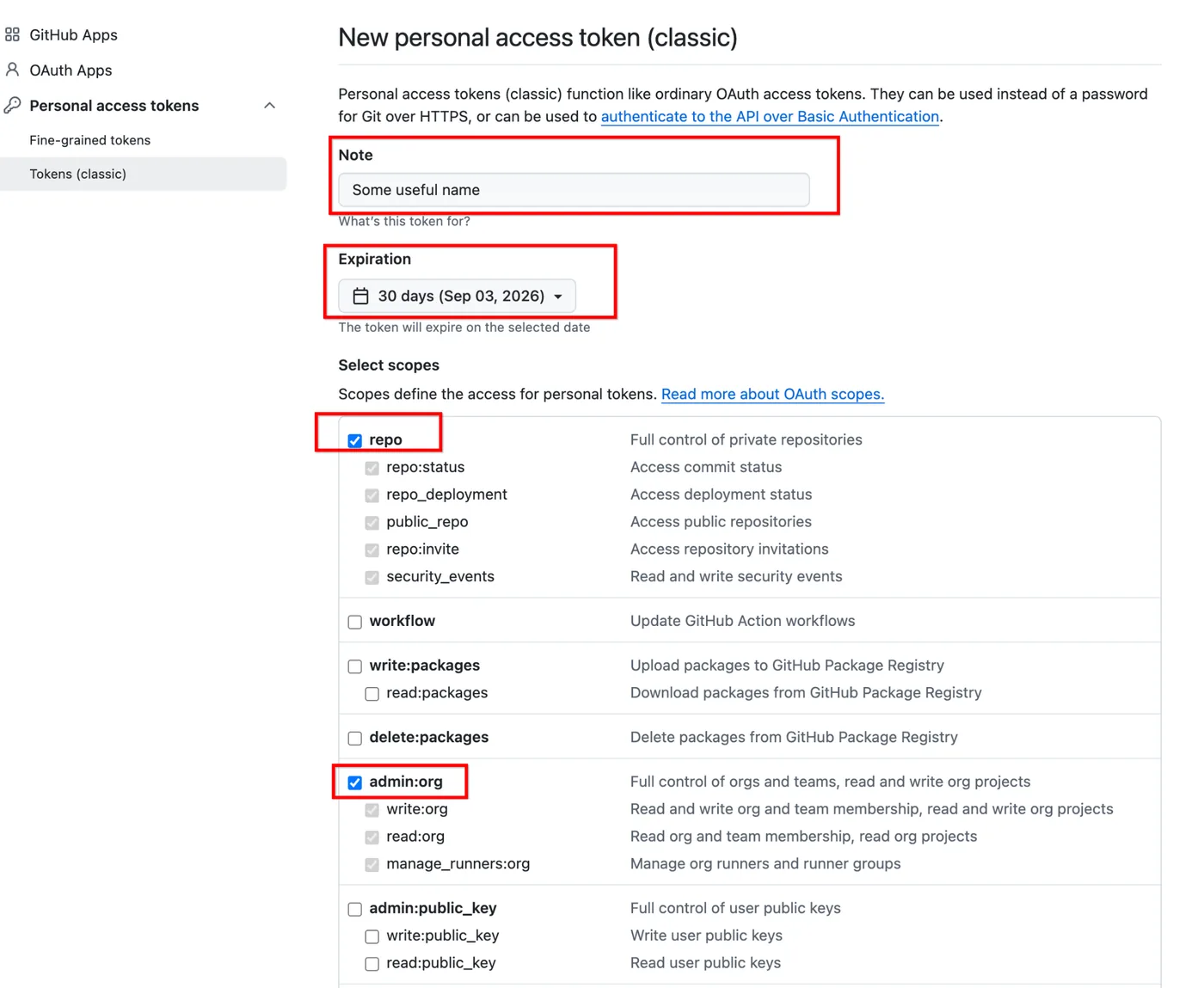
Sign in to GitHub, click your profile photo in the top right, then Settings. Scroll to the bottom of the left sidebar and click Developer settings. Open Personal access tokens, then Tokens (classic). Click Generate new token, then Generate new token (classic). Give it a name such as Migration API Token and set an expiry date.
Repository on your own account: tick repo and user. Repository in an organisation: tick repo and admin:org.
Organisation repositories: you must be an Owner of the organisation, or have the Migrator role. An Owner can grant it: https://docs.github.com/en/migrations/ado/granting-the-migrator-role (opens in a new tab)
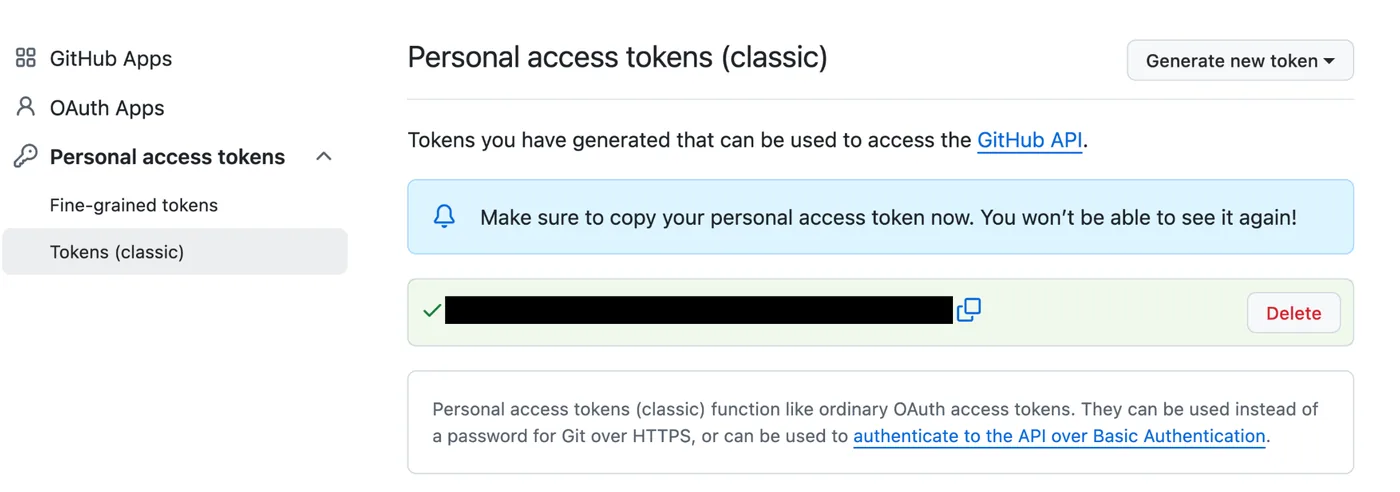
Click Generate token and copy it straight away. GitHub won't show it again once you leave the page. It replaces <YOUR_TOKEN> in every command below.
Send a POST request to the Migration API. Your GitHub username and repository name come from the fields at the top of this page (for an organisation, replace <YOUR_ORG_NAME> and the repository name is enough).
curl -L -X POST -H "Accept: application/vnd.github+json" \
  -H "Authorization: Bearer <YOUR_TOKEN>" \
  -H "X-GitHub-Api-Version: 2022-11-28" \
  -d '{"lock_repositories":false, "repositories":["{github-username}/{repo-name}"]}' \
https://api.github.com/user/migrationscurl -L -X POST -H "Accept: application/vnd.github+json" \
-H "Authorization: Bearer <YOUR_TOKEN>" \
-H "X-GitHub-Api-Version: 2026-03-10" \
https://api.github.com/orgs/<YOUR_ORG_NAME>/migrations \
-d '{"lock_repositories":false, "repositories":["{repo-name}"]}'{
"id": 12345678,
"owner": { "login": "username", ... },
"state": "pending",
"lock_repositories": false,
"exclude_git_data": false,
...
}GitHub builds the archive in the background. Run the command below with your MIGRATION_ID. If "state" is "pending" or "exporting", wait a minute and run it again. When it says "exported", the archive is ready. Large repositories can take a while.
curl -L -H "Accept: application/vnd.github+json" \
  -H "Authorization: Bearer <YOUR_TOKEN>" \
  -H "X-GitHub-Api-Version: 2022-11-28" \
https://api.github.com/user/migrations/<MIGRATION_ID>curl -L -H "Accept: application/vnd.github+json" \
-H "Authorization: Bearer <YOUR_TOKEN>" \
-H "X-GitHub-Api-Version: 2026-03-10" \
https://api.github.com/orgs/<YOUR_ORG_NAME>/migrations/<MIGRATION_ID> "id": 12345678,
...
"state": "exported",Send the final request to download the .tar.gz. The archive is saved under your repository name. GitHub also emails you "[GitHub] Your data export is ready to download" with a download link, if you prefer the browser. The archive stays available for seven days.
curl -L -H "Accept: application/vnd.github+json" \
  -H "Authorization: Bearer <YOUR_TOKEN>" \
  -H "X-GitHub-Api-Version: 2022-11-28" \
https://api.github.com/user/migrations/<MIGRATION_ID>/archive -o {repo-name}.tar.gzcurl -L -H "Accept: application/vnd.github+json" \
-H "Authorization: Bearer <YOUR_TOKEN>" \
-H "X-GitHub-Api-Version: 2026-03-10" \
https://api.github.com/orgs/<YOUR_ORG_NAME>/migrations/<MIGRATION_ID>/archive -o {repo-name}.tar.gzCheck what is inside before you send it. Run these from the folder holding the archive, with check-repo.sh downloaded next to it.
The ref list in 2 must show every branch and tag you cleaned, and none of your backup or pre-clean branches: if one is there, its old history is in the archive, so delete it on GitHub and export again. refs/pull/* are expected: GitHub adds one per pull request, never rewrites them, and only GitHub can remove them, so they hold pre-clean files. check-repo.sh reports what they hold in section [10]; send us that, and we decide together on the handover call. Don't send the archive if any branch shows run_instruction.md MISSING, the check in 4 doesn't end RESULT: ready, or 5 names a file you haven't checked.
# Number of pull request files. 0 is only right if the repo has no pull requests.
tar -tzf {repo-name}.tar.gz | grep -c 'pull_requests_'

# The git repository. Must print one line.
tar -tzf {repo-name}.tar.gz | grep -m1 -E 'repositories/[^/]+/[^/]+\.git/'mkdir export-check && tar -xzf {repo-name}.tar.gz -C export-check
GITDIR="$(echo export-check/repositories/*/*.git)"
# Every branch, tag and pull request ref in the archive
git --git-dir="$GITDIR" for-each-ref --format='%(refname)'for ref in $(git --git-dir="$GITDIR" for-each-ref --format='%(refname)' refs/heads); do
printf '%s %s commits run_instruction.md: ' "$ref" "$(git --git-dir="$GITDIR" rev-list --count "$ref")"
git --git-dir="$GITDIR" cat-file -e "$ref:run_instruction.md" 2>/dev/null && echo yes || echo MISSING
donebash check-repo.sh "$GITDIR" | tee archive-check.txt# Must print nothing. Any file it names needs a look before you send the archive.
grep -lEi 'sk_live|sk_test|AKIA[0-9A-Z]{16}|ghp_|github_pat_|glpat-|PRIVATE KEY|password' export-check/*.jsonThe same idea on GitLab: a token, then start, wait and download.
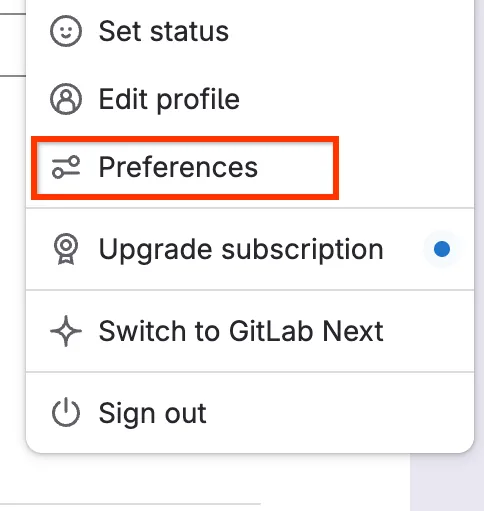
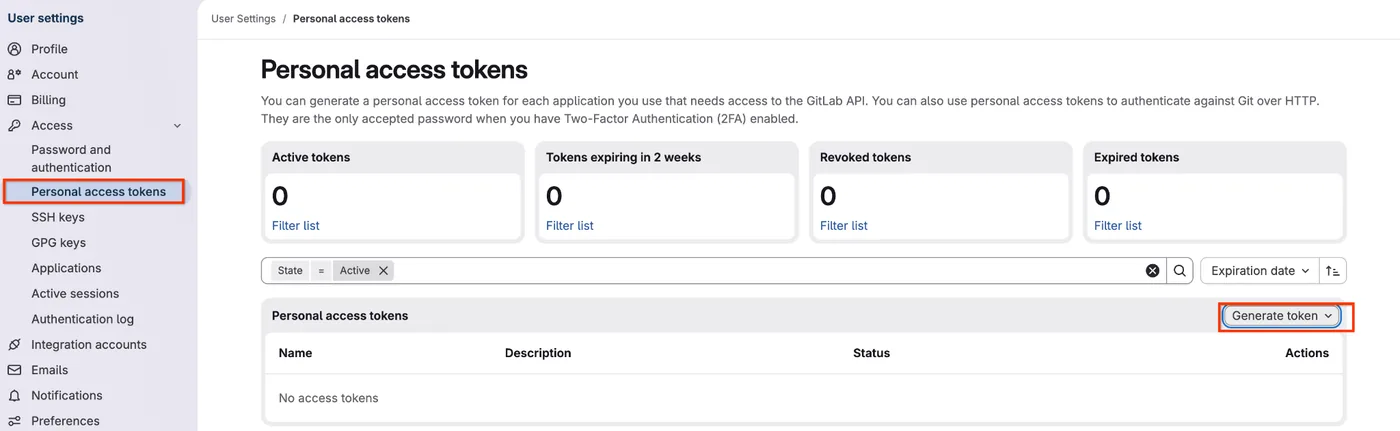
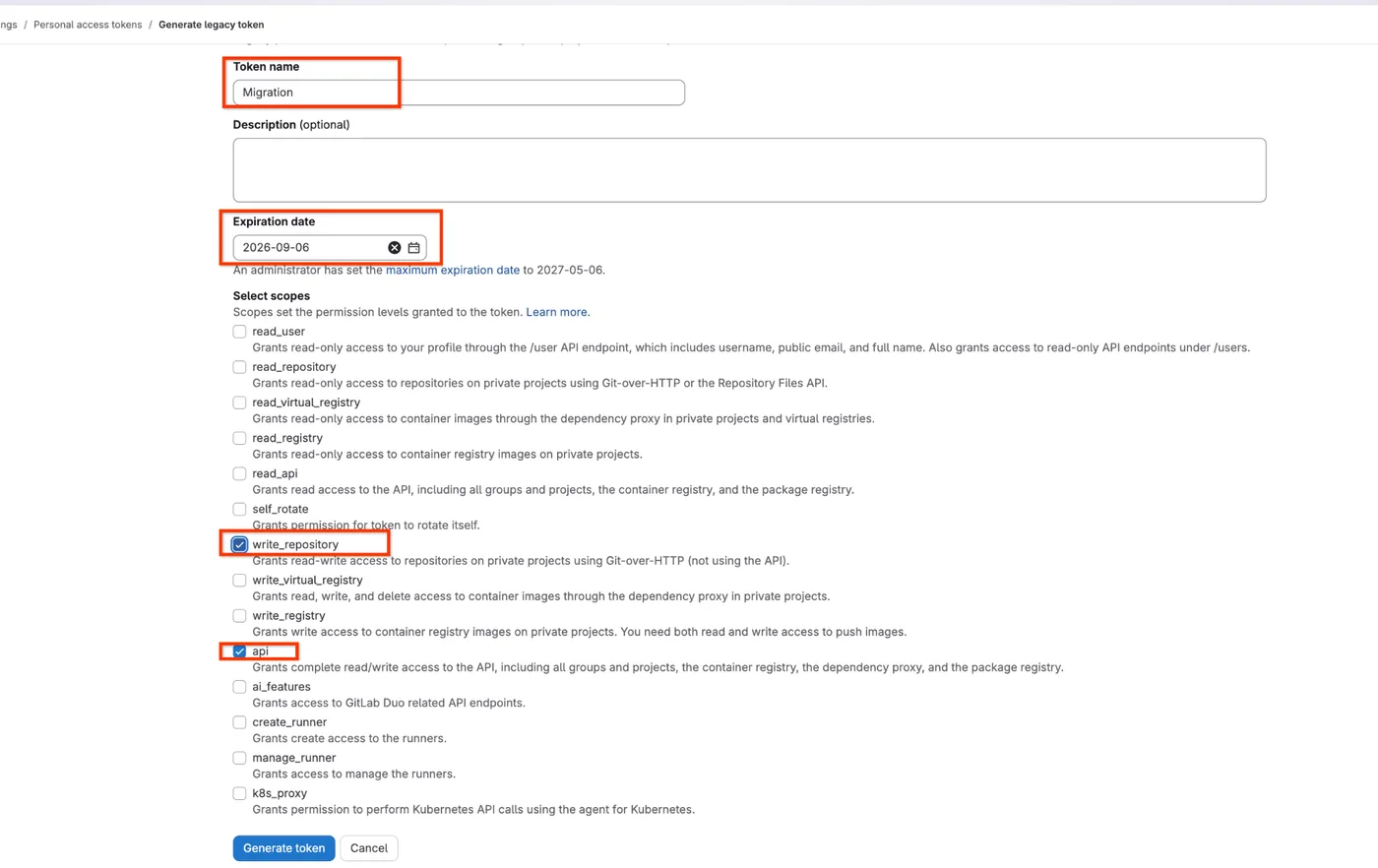
Click your avatar in the top right, then Preferences. Open Access, then Personal access tokens, and click Generate token. Choose Legacy token, give it a name and an expiry date, tick api and write_repository, then click Generate token. Copy it straight away; GitLab won't show it again.
Your username and repository name come from the fields at the top of this page; the / between them is written %2F. A 202 Accepted reply means GitLab has started building the archive.
curl --request POST --header "PRIVATE-TOKEN: <YOUR_TOKEN>" \
"https://gitlab.com/api/v4/projects/{github-username}%2F{repo-name}/export"If export_status is queued or started, wait a minute and run it again. When it is finished, copy the "id" (your project ID) or the api_url from the response.
curl --request GET --header "PRIVATE-TOKEN: <YOUR_TOKEN>" \
"https://gitlab.com/api/v4/projects/{github-username}%2F{repo-name}/export"{"id":12345678, ..., "export_status":"finished",
"_links":{"api_url":"https://gitlab.com/api/v4/projects/12345678/export/download", ...}}Use the project ID from the previous step. Then check it the same way as on GitHub: project.bundle holds the history, the merge requests sit in the project tree, and every branch and tag you cleaned must be there, each branch with run_instruction.md. Search the merge request files for secrets too.
curl --request GET --header "PRIVATE-TOKEN: <YOUR_TOKEN>" \
  -o {repo-name}.tar.gz \
  "https://gitlab.com/api/v4/projects/<PROJECT_ID>/export/download"

# History and merge requests are there
tar -tzf {repo-name}.tar.gz | grep -c 'project\.bundle'
tar -tzf {repo-name}.tar.gz | grep -c 'merge_requests'   # 0 only if there are none

# Branches and run_instruction.md
mkdir gl-check && tar -xzf {repo-name}.tar.gz -C gl-check
git clone --bare --quiet gl-check/project.bundle gl-check/repo.git
git --git-dir=gl-check/repo.git for-each-ref --format='%(refname)'
for ref in $(git --git-dir=gl-check/repo.git for-each-ref --format='%(refname)' refs/heads); do
  printf '%s  run_instruction.md: ' "$ref"
  git --git-dir=gl-check/repo.git cat-file -e "$ref:run_instruction.md" 2>/dev/null && echo yes || echo MISSING
done
bash check-repo.sh gl-check/repo.git | tee archive-check.txtWhen the archive is verified, upload it in the form with your name and your check-repo.sh report. It opens in a new tab.
Typically, your account doesn't own the repository. A user export only covers repositories you own; collaborator access is rejected. If it's in an organisation, use the organisation commands, with an Owner or Migrator account. If neither works for you, message us.
That's a fine-grained token. The Migration API needs a classic token (it starts with ghp_). Create one under Tokens (classic).
Only if it's committed in the repo. Write it, commit it at the root of every branch and push before you clean the history and before you export. If you add it afterwards, you have to run the clean-up and the export again.
GitHub adds a read-only ref for each pull request and never rewrites it, and the export includes them, so they keep each pull request's files from before your clean-up. You can't delete them. Rotating every credential first makes any secret there useless; personal data isn't fixed by rotation. Tell us what check-repo.sh reports in section [10], and we decide together on the handover call.
No. lock_repositories is false, so the repository stays usable while GitHub builds the archive. Nothing is deleted or moved.
Large repositories take longer. Keep checking every few minutes. If it says failed, start a new export.
Yes. Once the archive is downloaded and verified, delete the token on GitHub or GitLab.
Questions? WhatsApp Cephas Brian on 0758 294 212 or email xephas@aptahq.com or projects@aptahq.com